

GNNTable
This class represents a Snowflake Table, which can be either a data table or a relationship between data tables. Both are defined by a set of named and typed columns and a set of rows. In this context, data tables are referred to as nodes, while relationships are represented as edges.
Node:
If a GNNTable is of type node, each row in the table gets materialized as a node in the graph. A node GNNTable must satisfy the following conditions:
- It must define at least one candidate key or at least one foreign key;
GNNTables without a candidate or foreign key are considered invalid. A candidate key is a column in a table that can uniquely identify each record, ensuring that no two rows have the same key value. A foreign key is a column in one table that establishes a link to the candidate key of another table, ensuring referential integrity between related data. - It can have multiple candidate keys, multiple foreign keys but only one time column.
Example:
Consider three tables in a university database: Students, Classes, and Grades.
Students, Classes and Grades are going to be represented as node GNNTables. Each student, each class and each grade becomes a node in the graph.
Candidate-foreign key relationships (e.g., studentId in Grades referencing Students, classId in Grades referencing Classes) can be used to connect these nodes, as shown in the schema below:
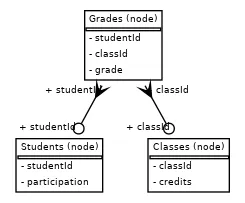
As you can see it is possible to construct a graph using only node-type GNNTables and connect them via candidate-foreign key relationships.
Edge:
If a GNNTable is of type edge, each row represents an edge connecting two nodes in the graph. Unlike node GNNTables, the rows of an edge-type GNNTable are not materialized as nodes; they exist only as edges. An edge GNNTable must satisfy the following conditions:
- It must have exactly two columns. Both columns must be foreign keys pointing to candidate key columns of other
GNNTables. - It cannot contain additional columns, as edges with features are not yet supported.
Example:
Now consider three tables in a university database: Students, Classes, and Enrolments.
Enrolments has columns studentId (foreign key pointing to Students) and classId (foreign key pointing to Classes). Each student and each class still becomes a node in the graph, but each row in Enrollments represents an edge from a Students node to a Classes node. The Enrolments table is represented as an edge GNNTable, connecting two node GNNTables, as shown in the schema below:
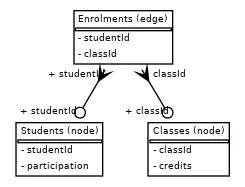
Note that the Enrolments table has only two columns, each corresponding to a foreign key. Of course, such a table can also be defined as a node GNNTable if the user wants its rows to be materialized as nodes in the generated graph.
The use of an edge-type GNNTable allows the creation of homogeneous graphs, such as the one built in the Smoker Status Prediction example.
The GNNTable class supports:
- Defining candidate keys
- Defining foreign keys
- Selecting input columns and configuring their data types
- Specifying a time column - For details, see the Time Columns section in the
Taskpage.
When creating a GNNTable instance from a Snowflake table, column data types are automatically populated. You can adjust these types as needed using the update_column_dtype method.
Note: The
GNNTabledoes not provide access to the actual data (it does not load a dataframe with the data from a Snowflake table). TheGNNTabledescribes the metadata of a database table. Table names and column names are case-sensitive and must comply with Snowflake object identifier rules. Always reference them exactly as they appear in Snowflake.
⚠️ Important Note:
Ensure the role you specified in the Provider and SnowflakeConnector has the necessary permissions to access the databases you intend to read from and write to. Without these grants, the GNN engine will not be able to query data or store results.
Parameters
Section titled “Parameters”| Name | Type | Description | Optional |
|---|---|---|---|
connector | SnowflakeConnector | The connector object used for sending requests to the GNN engine. | No |
source | str | The name of a Snowflake table, specified in the format <Database.Schema.Table>. | No |
name | str | A user-defined name for the table. Each GNNTable is uniquely identified by this name. | No |
type | str | Specifies the type of the table, which can be either: node – represents entities in the graph or edge – represents relationships between entities. | No |
candidate_keys | Set[CandidateKey] | A set of one or more candidate keys for the table. | Yes |
foreign_keys | Set[ForeignKey] | A set of one or more foreign keys for the table. | Yes |
time_column | str | The name of the column representing time. For details, see the Time Columns section in the Task page. | Yes |
Returns
Section titled “Returns”An instance of the GNNTable class.
Examples
Section titled “Examples”Creating a Node GNNTable with a Candidate Key
Section titled “Creating a Node GNNTable with a Candidate Key”from relationalai_gnns import GNNTable
table_with_ckey = GNNTable( connector=connector, name="TableWithCKey", source="DATABASE.SCHEMA.TABLE_WITH_CKEY", type="node", candidate_keys=[CandidateKey(column_name="Id")])Creating a Node GNNTable with two Foreign Keys
Section titled “Creating a Node GNNTable with two Foreign Keys”from relationalai_gnns import GNNTable, ForeignKey, CandidateKey
table_with_ckey_1 = GNNTable( connector=connector, name="TableWithCKey1", source="DATABASE.SCHEMA.TABLE_WITH_CKEY_1", type="node", candidate_keys=[CandidateKey(column_name="Id1")])
table_with_ckey_2 = GNNTable( connector=connector, name="TableWithCKey2", source="DATABASE.SCHEMA.TABLE_WITH_CKEY_2", type="node", candidate_keys=[CandidateKey(column_name="Id2")])
table_with_foreign_keys = GNNTable( connector=connector, name="TableWithFKeys", source="DATABASE.SCHEMA.TABLE_WITH_FKEYS", type="node", foreign_keys=[ForeignKey(column_name="Id1", link_to="TableWithCKey1.Id1"), ForeignKey(column_name="Id2", link_to="TableWithCKey2.Id2")])Creating a Node GNNTable with a Candidate Key and a Time Column
Section titled “Creating a Node GNNTable with a Candidate Key and a Time Column”from relationalai_gnns import GNNTable, CandidateKey
table_with_ckey = GNNTable( connector=connector, name="TableWithCKey2", source="DATABASE.SCHEMA.TABLE_WITH_CKEY_2", type="node", candidate_keys=[CandidateKey(column_name="Id2")], time_column="timestamp")Creating an Edge GNNTable
Section titled “Creating an Edge GNNTable”from relationalai_gnns import GNNTable, ForeignKey
table_with_ckey = GNNTable( connector=connector, name="TableWithExactlyTwoForeignKeys", source="DATABASE.SCHEMA.RELATIONSHIP_TABLE", type="edge", foreign_keys=[ForeignKey(column_name="Id1", link_to="TableWithCKey1.Id1"), ForeignKey(column_name="Id2", link_to="TableWithCKey2.Id2")])