

Prepare the Synthetic Academic Dataset
The following section provides instructions for preparing the synthetic academic dataset used in the Overview.
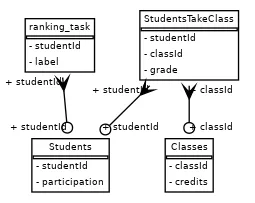
We have defined a predictive ranking task on this dataset, formulated as a binary node classification problem. Each node represents a student, and the objective is to predict whether that student will rank in the top 50% of the cohort. The target label is defined as:
- 1 → student belongs to the top 50%
- 0 → student belongs to the bottom 50%
This task evaluates the model’s ability to distinguish higher-performing students from lower-performing ones, based on the available features and relationships in the dataset.
The dataset consists of three simple tables:
-
STUDENTS— each row represents a student, identified by a uniquestudentId. -
CLASSES— each row represents a class, identified by a uniqueclassId. -
STUDENT_TAKES_CLASS— each row indicates which student took which class and includes the grade they received.
This is the database’s schema along with the ranking task:
Set up Database Objects
Section titled “Set up Database Objects”In the following steps, you will create Snowflake database objects such as a warehouse, schema, stage, and more. All the following commands should be run in a Snowflake SQL worksheet. For convenience, the complete set of commands explained below is available here:
create_assets.sql
USE ROLE ACCOUNTADMIN;
-- set up of constants, change the names in this section of what assets you'd like to create,-- no need to touch the rest of the code
SET db_name = 'synth_db'; --database to store all tables of the synthetic academic datasetSET schema_name = 'synth_schema'; -- schema to store the database tablesSET schema_full_name = $db_name||'.'||$schema_name; -- full path to the schemaSET schema_rank_name = 'synth_rank'; -- another schema to store the task (training) data tablesSET schema_rank_full_name = $db_name||'.'||$schema_rank_name; -- full path to the schemaSET schema_model_registry_name = 'model_registry'; -- schema to store experiments resultsSET schema_model_registry_full_name = $db_name||'.'||$schema_model_registry_name; -- full path to the schemaSET stage_name = 'synth_stage'; -- stage to upload csv tablesSET stage_full_name = $schema_full_name||'.'||$stage_name; -- full path to the stageSET wh_name = 'synth_wh'; -- warehouse to useSET wh_size = 'X-SMALL'; -- warehouse sizeSET role_name = 'SYSADMIN';   -- what role will have access to the db/warehouse/schema etc.
-- create role if neededCREATE ROLE IF NOT EXISTS identifier($role_name);USE ROLE identifier($role_name);
-- create a databaseCREATE DATABASE IF NOT EXISTS identifier($db_name);USE DATABASE identifier($db_name);
-- create warehouseCREATE OR REPLACE WAREHOUSE identifier($wh_name) WITH WAREHOUSE_SIZE = $wh_size;
-- create schemasCREATE SCHEMA IF NOT EXISTS identifier($schema_full_name);USE SCHEMA identifier($schema_full_name);
CREATE SCHEMA IF NOT EXISTS identifier($schema_rank_full_name);
-- create a stageCREATE STAGE IF NOT EXISTS identifier($stage_full_name) DIRECTORY = ( ENABLE = true );GRANT READ ON STAGE identifier($stage_full_name) TO ROLE identifier($role_name);
-- grant access to resources needed for snowflake experiment trackingGRANT USAGE ON DATABASE identifier($db_name) TO APPLICATION RELATIONALAI;GRANT USAGE ON SCHEMA identifier($schema_model_registry_full_name) TO APPLICATION RELATIONALAI;-- grant access to store experiment resultsGRANT CREATE EXPERIMENT ON SCHEMA identifier($schema_model_registry_full_name) TO APPLICATION RELATIONALAI;-- grant access to register modelsGRANT CREATE MODEL ON SCHEMA identifier($schema_model_registry_full_name) TO APPLICATION RELATIONALAI;
Specify Object Names
Section titled “Specify Object Names”You can choose your own names for these objects and define them as variables at the beginning of your script. This allows the rest of the code to reference those variables consistently when creating the necessary objects.
Below is an example configuration for setting the names of your database, warehouse, stage, and other assets:
USE ROLE ACCOUNTADMIN;
SET db_name = 'synth_db'; --database to store all tables of the synthetic academic datasetSET schema_name = 'synth_schema'; -- schema to store the database tablesSET schema_full_name = $db_name||'.'||$schema_name; -- full path to the schemaSET schema_rank_name = 'synth_rank'; -- another schema to store the task (training) data tablesSET schema_rank_full_name = $db_name||'.'||$schema_rank_name; -- full path to the schemaSET schema_model_registry_name = 'model_registry'; -- schema to store experiments resultsSET schema_model_registry_full_name = $db_name||'.'||$schema_model_registry_name; -- full path to the schemaSET stage_name = 'synth_stage'; -- stage to upload csv tablesSET stage_full_name = $schema_full_name||'.'||$stage_name; -- full path to the stageSET wh_name = 'synth_wh'; -- warehouse to useSET wh_size = 'X-SMALL'; -- warehouse sizeSET role_name = 'SYSADMIN';   -- what role will have access to the db/warehouse/schema etc.
Create Role
Section titled “Create Role”The following step creates and selects the role that will have access to your database. This is the role you should be using in the Predictive Reasoner Python SDK to be able to read from and write to the database.
CREATE ROLE IF NOT EXISTS identifier($role_name);USE ROLE identifier($role_name);Create a Database
Section titled “Create a Database”Next, you will create a database:
CREATE DATABASE IF NOT EXISTS identifier($db_name);USE DATABASE identifier($db_name);Create a Warehouse
Section titled “Create a Warehouse”Next, you will create a warehouse:
CREATE OR REPLACE WAREHOUSE identifier($wh_name) WITH WAREHOUSE_SIZE = $wh_size;Create Schemas
Section titled “Create Schemas”You will need two schemas: the synth schema, which contains the synthetic academic dataset tables, and the rank schema, which holds the task training tables. You can create these schemas using the following commands:
CREATE SCHEMA IF NOT EXISTS identifier($schema_full_name);USE SCHEMA identifier($schema_full_name);
CREATE SCHEMA IF NOT EXISTS identifier($schema_rank_full_name);
Create a Stage
Section titled “Create a Stage”You will need a stage to upload the raw CSV data, which will then be imported into Snowflake tables. You can create the stage using the following command:
CREATE STAGE IF NOT EXISTS identifier($stage_full_name) DIRECTORY = ( ENABLE = true );GRANT READ ON STAGE identifier($stage_full_name) TO ROLE identifier($role_name);Grant Access to the RelationalAI Native App
Section titled “Grant Access to the RelationalAI Native App”To enable the RelationalAI application to save the results of training, such as registered models and training metrics, you also need to grant it the necessary access permissions.
-- grant access to resources needed for snowflake experiment tracking
GRANT USAGE ON DATABASE identifier($db_name) TO APPLICATION RELATIONALAI;GRANT USAGE ON SCHEMA identifier($schema_model_registry_full_name) TO APPLICATION RELATIONALAI;-- grant access to store experiment resultsGRANT CREATE EXPERIMENT ON SCHEMA identifier($schema_model_registry_full_name) TO APPLICATION RELATIONALAI;-- grant access to register modelsGRANT CREATE MODEL ON SCHEMA identifier($schema_model_registry_full_name) TO APPLICATION RELATIONALAI;
Get and Upload Data to the Stage
Section titled “Get and Upload Data to the Stage”Download the Synthetic Academic Dataset files and upload them to the Snowflake stage you created in the previous step.
In Snowsight, navigate to the left sidebar and click on Data > Databases.
Next, locate the database you just created, then select the schema, followed by Stages, and finally click on the stage you created.
For example, if you followed the naming convention in this guide, you would navigate to:
SYNTH_DB > SYNTH_SCHEMA > Stages > SYNTH_STAGE.
Next, you will need to add some files to the stage. To do this, click the Files button in the top-right corner.
In the upload window that appears, select and upload the following files:
students.csvclasses.csvstudent_takes_class.csvstudent_rank_train.csvstudent_rank_validation.csvstudent_rank_test.csv
You can select the files and drag and drop them into the upload window.
Once you dragged and dropped the files click on the Upload button.
Load the Data into Snowflake Tables
Section titled “Load the Data into Snowflake Tables”Once all the files are uploaded to the stage, you can import the data into Snowflake tables.
To do this, run the following commands in a Snowflake SQL worksheet:
import_data.sql
-- Script to load the synthetic academic dataset into Snowflake tables
USE ROLE SYSADMIN;USE DATABASE SYNTH_DB;USE SCHEMA SYNTH_SCHEMA;USE WAREHOUSE SYNTH_WH;
-- Create a file format for CSVCREATE OR REPLACE FILE FORMAT my_csv_format    TYPE = 'CSV'    FIELD_DELIMITER = ','    SKIP_HEADER = 1    NULL_IF = ('NULL', 'null')    FIELD_OPTIONALLY_ENCLOSED_BY = '0x22'    EMPTY_FIELD_AS_NULL = TRUE;
-- Create the students tableCREATE OR REPLACE TABLE STUDENTS (  "studentId" NUMBER(38,0),  "participation" FLOAT);
-- Copy data into the students tableCOPY INTO STUDENTSFROM '@"SYNTH_DB"."SYNTH_SCHEMA"."SYNTH_STAGE"/students.csv'FILE_FORMAT = my_csv_format;
-- Create the classes tableCREATE OR REPLACE TABLE CLASSES (    "classId" NUMBER(38,0),    "credits" FLOAT);
-- Copy data into the classes tableCOPY INTO CLASSESFROM '@"SYNTH_DB"."SYNTH_SCHEMA"."SYNTH_STAGE"/classes.csv'FILE_FORMAT = my_csv_format;
-- Create the student takes class tableCREATE OR REPLACE TABLE STUDENT_TAKES_CLASS (    "studentId" NUMBER(38,0),    "classId" NUMBER(38,0),    "grade" FLOAT);
-- Copy data into the student takes class tableCOPY INTO STUDENT_TAKES_CLASSFROM '@"SYNTH_DB"."SYNTH_SCHEMA"."SYNTH_STAGE"/student_takes_class.csv'FILE_FORMAT = my_csv_format;

USE SCHEMA SYNTH_RANK;
-- Create a file format for CSVCREATE OR REPLACE FILE FORMAT my_csv_format    TYPE = 'CSV'    FIELD_DELIMITER = ','    SKIP_HEADER = 1    NULL_IF = ('NULL', 'null')    FIELD_OPTIONALLY_ENCLOSED_BY = '0x22'    EMPTY_FIELD_AS_NULL = TRUE;
-- Create the train tableCREATE OR REPLACE TABLE TRAIN (    "studentId" NUMBER(38,0),    "label" NUMBER(38,0));
-- Copy data into the validation tableCOPY INTO TRAINFROM '@"SYNTH_DB"."SYNTH_SCHEMA"."SYNTH_STAGE"/student_rank_train.csv'FILE_FORMAT = my_csv_format;
-- Create the train tableCREATE OR REPLACE TABLE VALIDATION (    "studentId" NUMBER(38,0),    "label" NUMBER(38,0));
-- Copy data into the train tableCOPY INTO VALIDATIONFROM '@"SYNTH_DB"."SYNTH_SCHEMA"."SYNTH_STAGE"/student_rank_validation.csv'FILE_FORMAT = my_csv_format;
-- Create the train tableCREATE OR REPLACE TABLE TEST (    "studentId" NUMBER(38,0),    "label" NUMBER(38,0));
-- Copy data into the train tableCOPY INTO TESTFROM '@"SYNTH_DB"."SYNTH_SCHEMA"."SYNTH_STAGE"/student_rank_test.csv'FILE_FORMAT = my_csv_format;
-- Clean upREMOVE '@"SYNTH_DB"."SYNTH_SCHEMA"."SYNTH_STAGE"/students.csv';REMOVE '@"SYNTH_DB"."SYNTH_SCHEMA"."SYNTH_STAGE"/classes.csv';REMOVE '@"SYNTH_DB"."SYNTH_SCHEMA"."SYNTH_STAGE"/student_takes_class.csv';REMOVE '@"SYNTH_DB"."SYNTH_SCHEMA"."SYNTH_STAGE"/student_rank_train.csv';REMOVE '@"SYNTH_DB"."SYNTH_SCHEMA"."SYNTH_STAGE"/student_rank_validation.csv';REMOVE '@"SYNTH_DB"."SYNTH_SCHEMA"."SYNTH_STAGE"/student_rank_test.csv';
As a final cleanup step, we also removed the csv files from the stage since they were no longer needed.
After the above are complete, you will be able to see the imported tables listed under SYNTH_SCHEMA > Tables and SYNTH_RANK > Tables in your Snowflake environment.