

Install skill files
Requires relationalai (PyRel) v1.20.1+
The RelationalAI Native App for Snowflake must be installed in your account by an administrator.
- Request access here.
- See the RAI Native App docs for details.
The rai_developer role is needed to execute PyRel programs.
Empower your coding agent with the decision intelligence capabilities of RelationalAI.
Skills are markdown files encoding expert knowledge – heuristics, workflows, and patterns – distributed as folders
and installed into a location the agent can discover (e.g. ~/.claude/skills/). At runtime, the agent reads relevant
skills to inform its reasoning, and calls tools and APIs to take action.
+---------+ | Agent | +---------+ / \ reads calls / \+-------------+ +-------------+| Skills | | Tools/APIs || <knowledge> | | <actions> |+-------------+ +-------------+The skills in this repo instruct your agent how to use the relationalai Python package to leverage RelationalAI
ontologies and advanced reasoners by generating and executing PyRel code. They roughly map to workflow steps.
- Generating PyRel enables the agent to create the RelationalAI ontology, extend it with reasoners, and use its outputs.
- By executing PyRel, the agent can then query the ontology to answer questions, resolve issues, or help with setup.
What’s included
Section titled “What’s included”Invoke the skills using the /rai- command.
| # | Skill | Area | Description |
|---|---|---|---|
| 1 | rai-setup | Setup | First-time install, Snowflake connection, and all configuration including raiconfig.yaml, reasoners, engines |
| 2 | rai-pyrel | Development | PyRel v1 language: modeling syntax, data loading, business rules as derived properties, and query construction (aggregation, filtering, joins, export) |
| 3 | rai-ontology | Ontology | Build and evolve ontologies: starter builds from Snowflake tables or local data, plus domain modeling (concepts, relationships, identity, data mapping, enrichment) |
| 4 | rai-discovery | Reasoning | Surface answerable questions, classify by reasoner type, route to workflow |
| 5 | rai-graph-analysis | Reasoning | Graph algorithms: centrality, community detection, reachability, similarity, path enumeration |
| 6 | rai-predictive-modeling | Reasoning | Build graph neural network (GNN) models: data loading, task relationships, edges, feature transformers |
| 7 | rai-predictive-training | Reasoning | Train GNNs, generate predictions, evaluate results, manage trained models |
| 8 | rai-prescriptive-problem | Reasoning | Formulate optimization and CSAT problems (decision variables, constraints, objectives), plus solver selection and pre-solve validation |
| 9 | rai-prescriptive-results | Reasoning | Run solves and interpret output: execution, diagnostics, status codes, solution extraction, sensitivity, infeasibility |
| 10 | rai-deployment | Operations | Take a model to production: deploy to a Snowflake schema and manage its lifecycle (op log, branch, merge, teardown), plus Cortex agents (early access) |
| 11 | rai-health | Operations | Diagnose engine performance, failed transactions, and CDC/data-stream health |
Quickstart
Section titled “Quickstart”Easiest: point your coding agent at this repo and paste the prompt below.
Install the RelationalAI Agent Skills (https://github.com/RelationalAI/rai-agent-skills) for your current environment. Provide me with instructions on how to keep up-to-date and leverage them across projects. Once installed, print the skill inventory given in the README.Most robust: leverage an official channel that supports updates. The table below is for installing the skills on your own machine — if you’re rolling these out to a team, see Distribute to a team below.
Most flexible: clone the repo and symlink its skills into your agent’s skills directory. Local edits and
git pull updates propagate instantly across every linked agent. See Install from source under
Detailed install guides below.
Install for yourself
Section titled “Install for yourself”| Agent | Install | Updates |
|---|---|---|
| Any 45+ agents (Vercel CLI) | npx skills add RelationalAI/rai-agent-skills --skill '*' | npx skills update |
| Claude Code (CLI) | /plugin marketplace add RelationalAI/rai-agent-skills/plugin install rai@RelationalAI | Auto — enable Sync automatically |
| Claude (Desktop) | Use the Customize → Personal plugins + UI flow. See the Detailed Install Guide | Auto — enable Sync automatically |
| Cortex Code (CLI) | cortex skill add RelationalAI/rai-agent-skills/plugins/rai/skills | cortex skill update RelationalAI/rai-agent-skills |
| Cortex Code (Web) | Clone/download the repo, open a workspace in Snowsight, then click + in CoCo → Upload Skills Directory -> plugins/rai/skills/ | Re-upload the plugins/rai/skills/ folder |
| Codex (CLI) | codex plugin marketplace add RelationalAI/rai-agent-skillsThen inside a codex session: /plugins → install rai | codex plugin marketplace upgrade relationalai |
| VS Code / Copilot | Add "RelationalAI/rai-agent-skills" to chat.plugins.marketplaces, then install rai from Extensions (@agentPlugins) | Auto (every 24h) |
| Cursor | No personal marketplace import yet — use Remote Rules as a fallback. See the Cursor guide below | Manual re-import |
After installing, start a new session for the skills to become available.
Distribute to a team
Section titled “Distribute to a team”For channels with documented admin paths. Rows here complement — not replace — the individual install above.
| Channel | Setup | Rollout |
|---|---|---|
| Claude Code (project settings) | Commit extraKnownMarketplaces to .claude/settings.json so the marketplace travels with your repo | Teammates are prompted to add the marketplace and install rai on folder trust |
| Claude Code (managed / enforced) | Deploy enabledPlugins (force-enable) and/or strictKnownMarketplaces (allowlist) in OS-level managed-settings.json | Plugins force-enabled org-wide; users cannot disable |
| Cursor (Teams/Enterprise) | Dashboard → Settings → Plugins → Team Marketplaces → Import, paste this repo’s URL | Teammates see rai in their Plugins panel; re-import from dashboard to update |
| VS Code / Copilot (workspace) | Commit extraKnownMarketplaces (and optionally enabledPlugins) to .github/copilot/settings.json — or reuse .claude/settings.json above to cover both channels | VS Code surfaces a notification on first chat message; teammates browse via @agentPlugins @recommended in Extensions |
Detailed install guides
Section titled “Detailed install guides”Claude Code CLI
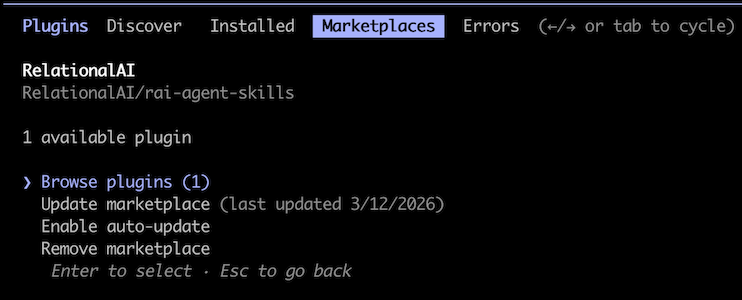
Follow these instructions to point at this repo. See this quick video for an overview.
/plugin marketplace add RelationalAI/rai-agent-skills/plugin install rai@RelationalAI# or use the wizard/pluginRestart your session after installing. To keep the plugin current, open the Plugins directory, click the ··· menu on the rai-agent-skills tile, and enable Sync automatically — it pulls new commits from the default branch without a manual step. Use Check for updates from the same menu for an on-demand refresh.
Claude Desktop
- Click Customize in the left sidebar.
- Next to Personal plugins, click the + button, then select Create plugin → Add marketplace.
- In the Add marketplace dialog, enter
RelationalAI/rai-agent-skillsand click Sync. - Click + next to Personal plugins again, then select Browse plugins.
- Open the Personal tab, find the Rai tile, and click + to install it.
- Recommended: on the rai-agent-skills plugin tile, open the ··· menu and toggle Sync automatically on. New commits on the default branch will be pulled in without a manual update step.
Alternatively, download this repo’s contents and copy the skills into the Claude app.
VS Code / GitHub Copilot
Follow these instructions to register this repo as a plugin marketplace.
"chat.plugins.marketplaces": ["RelationalAI/rai-agent-skills"]Then open the Extensions view (⇧⌘X), search @agentPlugins, and install Rai. Updates install automatically (every
24h by default when extensions.autoUpdate is on).
Cortex Code CLI
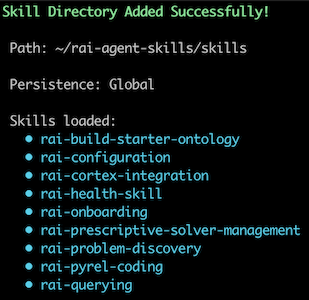
cortex skill add RelationalAI/rai-agent-skills/plugins/rai/skillsPoint Cortex at the /plugins/rai/skills subdirectory (not the repo root) — Cortex’s auto-discovery expects skills
at a conventional layout and will reject the repo root otherwise. Later, run
cortex skill update RelationalAI/rai-agent-skills to pull new versions.
Or follow the docs to clone the repo
locally and use the /skill dialog to add the plugins/rai/skills folder.
Cortex Code (Web)
Cortex Code in the Snowflake web UI doesn’t pull directly from GitHub — you load skills from a local folder.
- Clone the repo or download the ZIP and unzip it.
- In Snowsight, open a workspace and launch Cortex Code from the left sidebar.
- In the Cortex Code panel, click the + button and choose Upload Skill Folder(s).
- Select the repo’s
plugins/rai/skills/folder (not the repo root).
To update, pull the latest changes locally (or re-download the ZIP) and upload the plugins/rai/skills/ folder again.
OpenAI Codex (CLI)
This repo ships a Codex plugin marketplace manifest at .agents/plugins/marketplace.json, so you can add it directly
by GitHub shorthand:
codex plugin marketplace add RelationalAI/rai-agent-skillsThen start a Codex session and open the plugin browser:
codexInside the session, run the /plugins slash command, switch to the relationalai marketplace tab, and install
rai. Restart the session for skills to become available.
To pull new releases later:
codex plugin marketplace upgrade relationalaiSee the Codex plugins docs for more on the marketplace flow.
Cursor
This repo ships a Cursor marketplace manifest at .cursor-plugin/marketplace.json. How you install depends on your
plan.
Teams / Enterprise admins. Cursor supports importing a third-party plugin marketplace from a GitHub repo:
- Open Dashboard → Settings → Plugins.
- Under Team Marketplaces, click Import and paste
https://github.com/RelationalAI/rai-agent-skills. - Review the parsed plugins, assign Team Access groups, name the marketplace, and save.
Teammates then see rai in their Plugins panel and install it with one click. To pull new releases, re-import from the dashboard. Teams plans support up to 1 team marketplace; Enterprise supports unlimited.
Individual users. Cursor does not currently expose a personal marketplace-import UI, so plugin-level install isn’t available yet on free/Pro plans. As a fallback, use Remote Rules to get the skill content (without the plugin wiring):
- Follow these instructions.
- Paste
https://github.com/RelationalAI/rai-agent-skills.gitas a Remote Rule (GitHub).
Remote Rules do not auto-sync — re-import from GitHub (or git pull if you cloned into .cursor/rules/) to pick up
updates.
Any coding agent (Vercel skills CLI)
Vercel’s skills CLI (requires npm v5.2.0+) manages skills across 45+ agents
including Claude Code, Cursor, Codex, Copilot, Windsurf, Cline, Continue, Gemini CLI, Warp, and more.
# install all skills to all detected agentsnpx skills add RelationalAI/rai-agent-skills --skill '*'
# scope to a specific agentnpx skills add RelationalAI/rai-agent-skills --skill '*' --agent cortex
# later: pull updatesnpx skills update
Install from source (clone + symlink)
For power users and contributors: clone once and symlink each skill into every agent you use. Local edits and
upstream git pulls both propagate instantly — no re-import step.
git clone https://github.com/RelationalAI/rai-agent-skills.git ~/src/rai-agent-skillscd ~/src/rai-agent-skills
# link each skill into the agent's skills directory (Claude Code shown):for d in plugins/rai/skills/*/; do  ln -s "$PWD/$d" ~/.claude/skills/$(basename "$d")done
Swap the target directory for other agents: ~/.agents/skills/ (Codex), ~/.cursor/rules/ (Cursor — as Remote
Rules). To expose the plugin as a unit rather than loose skills, symlink the whole plugins/rai/ directory into
the agent’s local-plugins location (e.g., ~/.cursor/plugins/local/rai). Run git pull inside the clone to update.
External contributions
Section titled “External contributions”We welcome contributions from the community. The flow depends on which paths you’re touching.
Small fixes to skill content under plugins/rai/skills/ — typo fixes, doc
clarifications, minor corrections — are welcome as PRs. These paths are covered by
CODEOWNERS, so maintainers (@RelationalAI/rai-agent-skills-admin) are
auto-requested for review. Accepted PRs are merged upstream and carry forward into future releases,
with your authorship preserved via a Co-authored-by trailer — your fix won’t be lost in a later
release.
Substantive changes to a skill — adding a new skill, rewriting a large portion of an existing one, or altering its intended behavior — should start with an issue. Maintainers can help scope the work before you invest in a PR.
Non-skill paths — this README, LICENSE, plugin manifests under .claude-plugin/ and
plugins/rai/, and the examples under contrib/ — follow the standard PR flow and aren’t routed
through CODEOWNERS.